Morek CORE-series AC
Smart, Reliable, and Ready for Every Destination
The Morek EVC CORE-series AC chargers deliver a dependable and intelligent solution for charging electric vehicles (BEVs) and plug-in hybrid vehicles (PHEVs) across a wide range of everyday environments.
Designed for universality and simplicity, the CORE-series is an excellent fit for both private and public installations — including residential homes, apartment buildings, office parking areas, commercial sites, and hospitality locations.
Engineered for easy installation, the chargers feature a compact enclosure, flexible wiring options, and a durable construction suitable for both indoor and outdoor mounting. Their high-grade design ensures long-term reliability even in challenging weather conditions.
With a clear and user-friendly interface, the CORE-series supports seamless daily use while offering smart connectivity for integration with OCPP-based backend platforms. This enables remote monitoring, usage analytics, load management, and billing — giving operators full control over their charging infrastructure.
CORE-series provides efficient AC charging that balances speed, affordability, and compatibility with all modern European EVs.
Pairing robust safety features, EU-wide interoperability, and an excellent price-to-performance ratio, the Morek CORE-series AC chargers present a practical and reliable solution for homeowners, property managers, and businesses looking to expand or upgrade their EV charging capabilities with confidence.
Safety Instructions
Read and observe the following safety precautions before you install, service or user your Morek charging station. The installer must ensure that the charging station is installed in accordance with the relevant country-specific standards and local regulations.
Symbols used in this manual
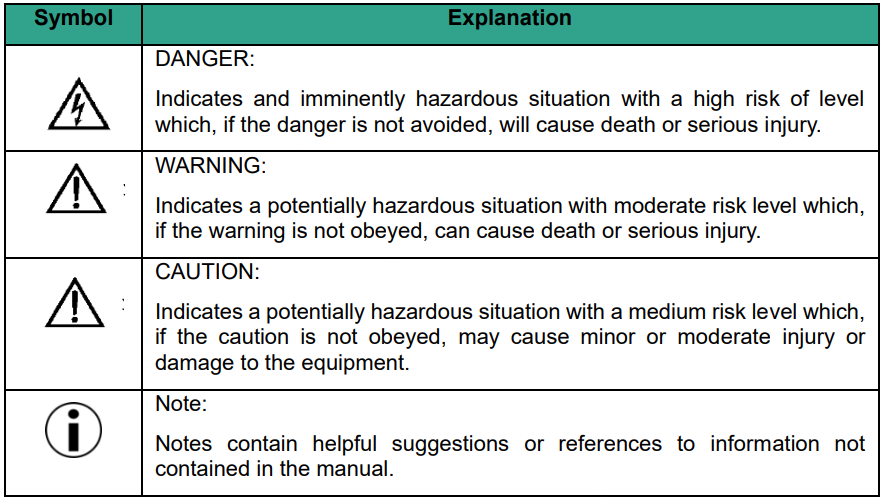
Save these instructions
This manual contains important instructions for Morek CORE-series AC charging station that need to be followed during installation, operation and maintenance of the unit.
WARNING: Risk of electric shock
- Switch off input power to your charging station before you install or service the charging station. Keep the power off until the charging station is fully installed with its covers secured.
- In the event of danger and/or an accident, a certified electrician must immediately disconnect the charging station from the electrical supply.
- Do not operate the charging station if it is physically damaged or if the charging cable has cracks, excessive wear, or other visible damage. Contact Morek or your distributor if you suspect that the charging station is damaged.
- Do not direct powerful jets of water toward or onto the charging station. Never operate it with wet hands. Do not put the EV charging plug into any liquid.
- Do not place fingers or other objects inside the charging port or plug port.
- Read the user instructions delivered with your Morek charging station and the User Manual for your electric vehicle before charging.
WARNING: Accumulation of gases
Some electric vehicles require an external ventilation system to prevent the accumulation of hazardous or explosive gases when charging indoors. Refer to your vehicle User Manual to check if your vehicle releases hazardous or explosive gases when charging.
CAUTION
- Use this charging station to charge compatible electric vehicles only. Refer to your vehicle user manual to check if your vehicle is compatible.
- This charging station may affect implanted electronic medical devices. Before you charge your vehicle, consult the supplier of the electronic medical device to determine if it can be affected by charging effects.
- This charging station contains no user-serviceable parts. The user must not attempt to service, repair, or relocate the charging station. Contact Morek or your distributor for more information.
- Make sure that the charging cable cannot be damaged (kinked, jammed, or driven over) and that the plug(s) do not come into contact with heat sources, dirt, or water.
- Only use the charging station under the specified operating conditions.
- Do not use explosives or flammable substances near the charging station.
- If you are unsure about how to use a charging station, ask for help.
- Do not allow children to operate a charging station. Adult supervision is required when children are near a charging station that is in use.
- Adapters, conversion adapters, or cord extensions must never be used on this charging station.
Charging station safety precautions

CAUTION:
Do not open the charging station doors when:
- It is raining, snowing.
- The charging station is exposed to direct sunlight.
- Weather conditions are wet (fog, ...).
Failure to follow these instructions can result in danger to the user and may void the warranty and liability.
This device contains components that can be damaged or destroyed by electrostatic discharge.
- When handling this device, observe the necessary safety measures regarding electrostatic discharge (ESD) according to EN61340-5-1 and 61340-5-2.
- This charging station must be stored and transported according to the specifications described in this manual.
- Even if the charging station can be used by a non-qualified person, the charging station may only be installed, commissioned, serviced, relocated, repaired and decommissioned by qualified persons. Failure to follow these instructions can result in danger to the user and may void the warranty and liability.
- Modification of the product is prohibited. It can result in danger to the user and may void the warranty and liability.
- This charging station contains no user-serviceable parts. The user must not attempt to service, repair, or relocate the charging station. Contact Morek or your distributor for more information.
- Make sure that the charging cable cannot be damaged (kinked, jammed, or driven over) and that the plug(s) do not come into contact with heat sources, dirt, or water.
- Only use the charging station under the specified operating conditions.
- Do not use explosives or flammable substances near the charging station.
- Do not use peripherals, consumables or accessories that do not conform or are unsuitable for the charging station.
- Do not use anti-graffiti treatment that may damage the charging station.
- Do not modify the features of the charging station (data settings, cabling, …).
- This charging station must be protected against animals, object intrusion or water ingress even if they do not alter charging station operation.
Failure to follow these instructions will result in damage to the charging station.
Product Specification -> click here
Product Basic Interface & Dimensions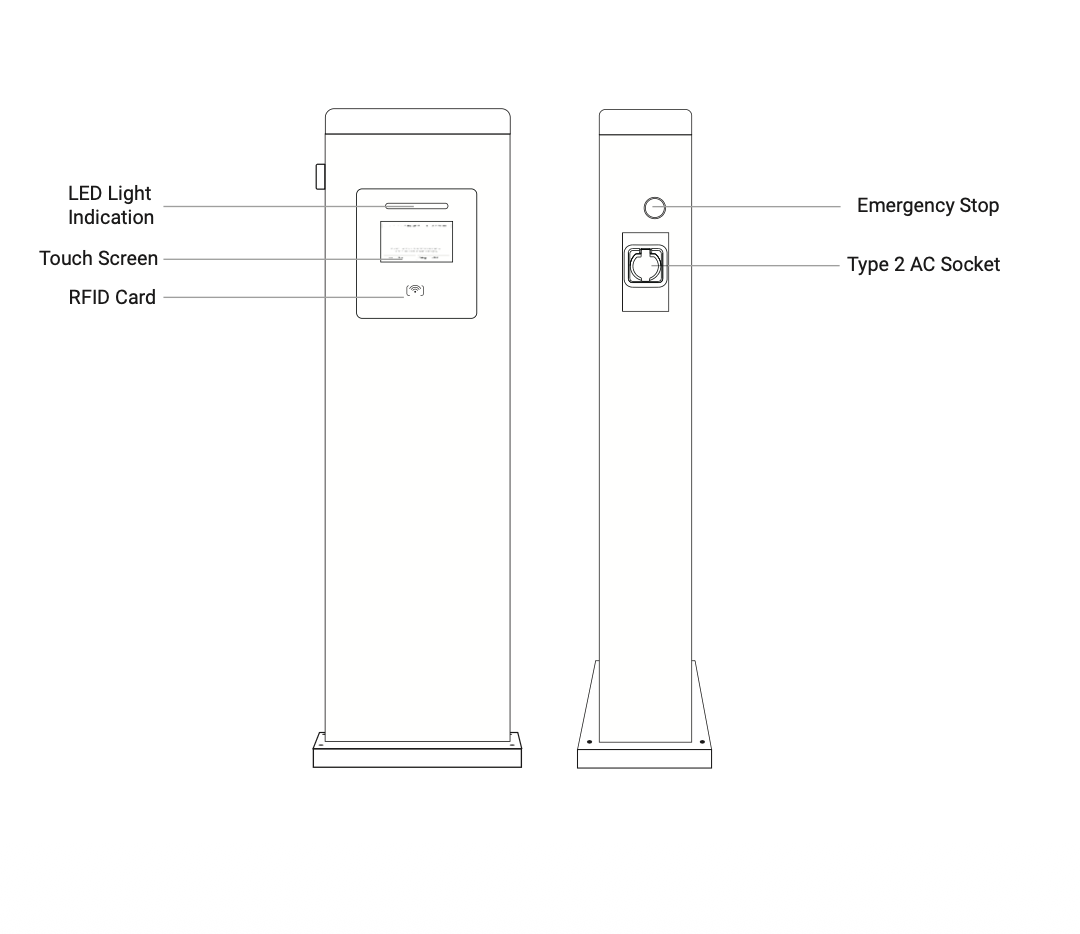
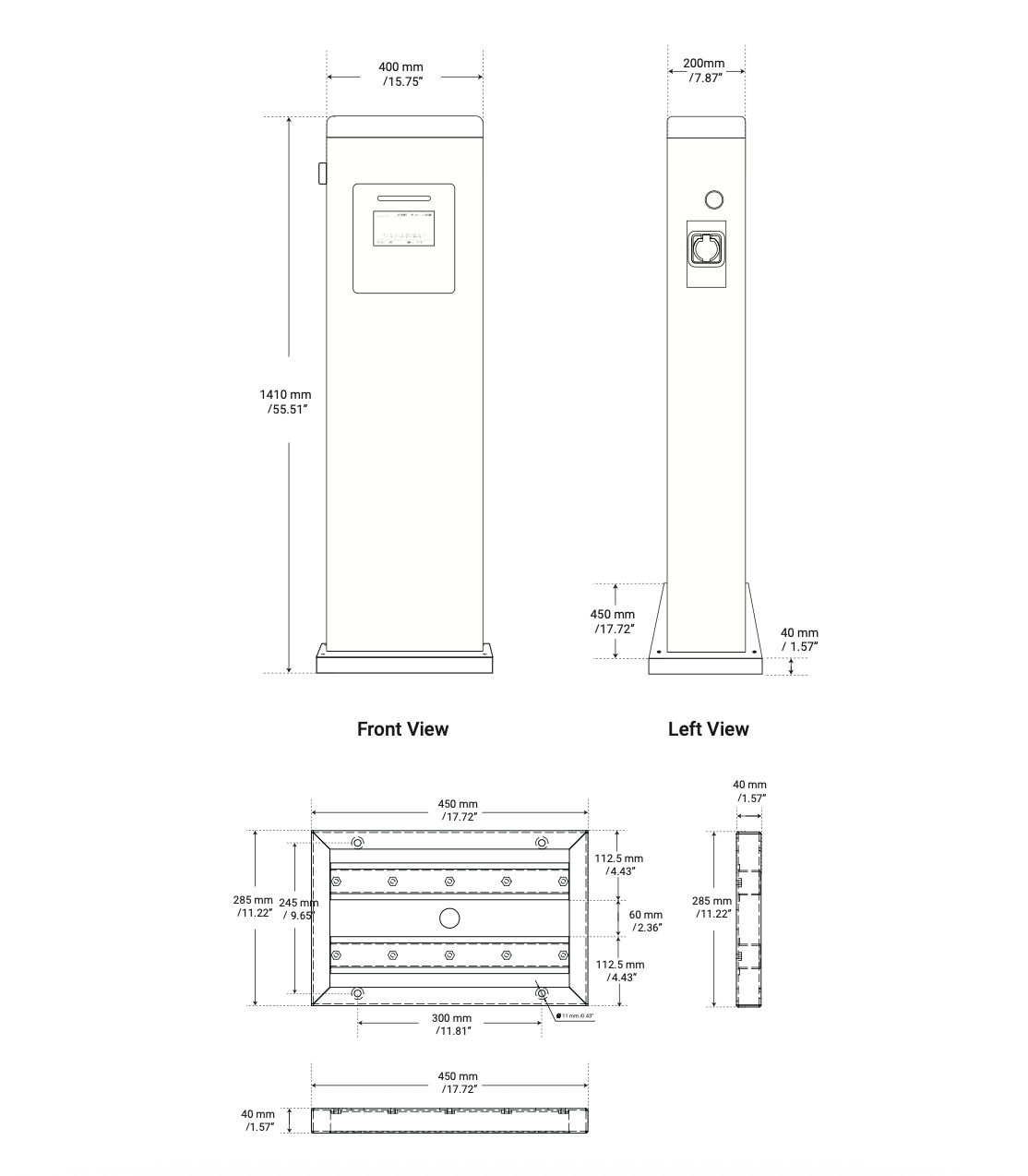
Installation Instruction
Open the charger box and remove the surrounding protective boards to access the product. Please note that the charger is heavy — it is strongly recommended to use a lifting tool both for removing it from the box and for positioning it at the installation site.
- Select the appropriate mounting location with electrical capacity.
- Ensure the owner has chosen a mounting location that allows the charging cable to reach the car’s charging port while still providing slack.
- Pre-bury the charging pile cable and leave an input line, with a length of more than 280mm.
- Use a proper foundation or solid ground to fix the charge point ground-mount bracket.
- If you’re not using the Morek AC charger foundation, use an electric drill to make four holes, 10 mm wide and 85 ± 5 mm deep and hammer down the 4 pcs expansion screws to the hole.
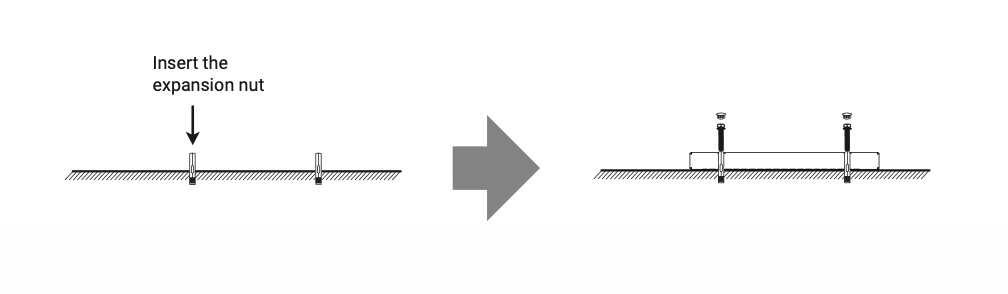
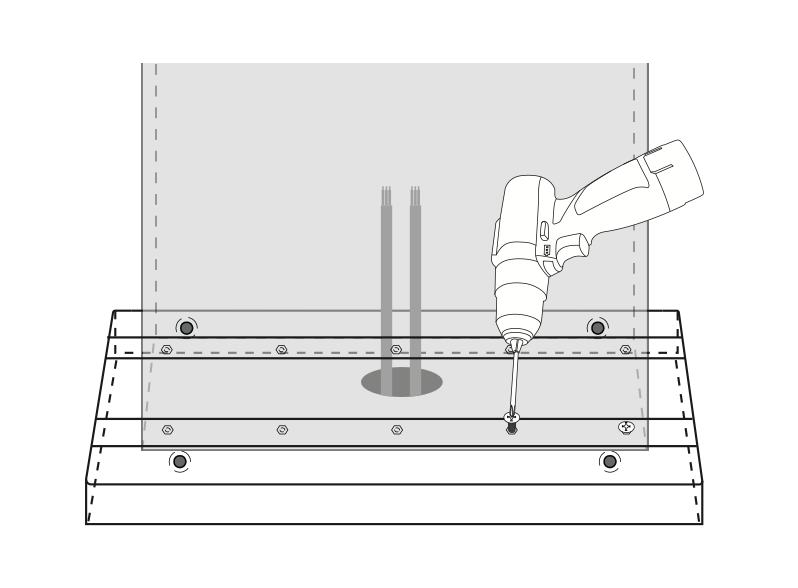
- Place the charging pole on the base and align the 10 holes. Use an electric drill or a Phillips screwdriver to tighten the 10 M8*12 Phillips screws.
- Loosen the screws on the input side of the circuit breaker, then connect L1, L2, L3, N, and PE in sequence.
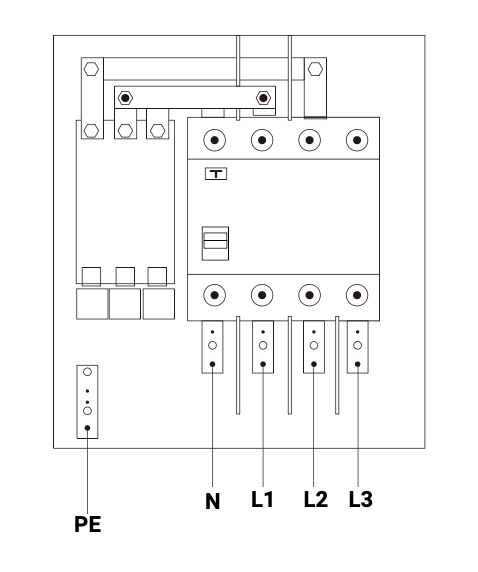
Prepare the cable and use standardized cable only. For input power AC cable, we suggest using cable size of 5*16mm². AC cable size depends on system configuration and local regulations. Refer to electrical installation drawings or discuss with electrical designer for further information.
For charger configuration, please refer to this manual: CORE-series charger configuration guide
After chargpoint start-up
Stand-by Waiting to plug-in | Waiting to Charge, Communicating with the Vehicle | Charging Session in Progress | Finished Charging | Fault |
Solid Yellow | Green Blinking | Slow Green Blinking | Green Blinking | Solid Red |
Error and Warning Message
No. | Error code | No of flashes | Fault description |
1 | 1000 | 3 | Emergency stop press,or emergency stop is broken |
2 | 1001 | 1 | Phase L3 Overvoltage |
3 | 1002 | 2 | Phase L3 Undervoltage |
4 | 1003 | 1 | Phase L2 Overvoltage |
5 | 1004 | 2 | Phase L2 Undervoltage |
6 | 1005 | 1 | Phase L1 Overvoltage |
7 | 1006 | 2 | Phase L1 Undervoltage |
8 | 1007 | 2 | Three phases are undervoltage |
9 | 1008 | 4 | Overcurrent Fault |
10 | 1009 | 5 | Over temperature |
11 | 1010 | 6 | RCD leakage protection |
12 | 1011 | 7 | 485 Fault |
13 | 1012 | 8 | Lightning Protection Fault |
14 | 1013 | 9 | Type A Switch Fault |
15 | 1014 | 10 | Relay Fault |
16 | 1015 | 11 | PE Fault |
17 | 1016 | 12 | PEN Fault |
18 | 1017 | 13 | Out of service |
19 | 1018 | 14 | Door opened |
20 | 10000 | SOLID | Unknow Fault |
Warranty and Maintenance
The default warranty period for this charger is two (2) years.
During this period, the Morek EVC Warranty Terms and Process apply.
Product Disposal and Waste Management
Guidelines for the disposal of Morek IT OÜ electric vehicle chargers (AC and DC chargers and charging cables) at the end of their useful life.
The user is responsible for the proper disposal of the device. Separate collection helps prevent environmental and health risks and facilitates the recycling of materials.
Title: WEEE - Description: Symbol of a crossed-out wheeled trash can

The crossed-out wheeled bin symbol on the product, packaging, or documentation means that at the end of its useful life, the device must not be disposed of with household waste—it must be placed in a separate collection for waste electrical and electronic equipment (WEEE).
The device can be taken to an electronic waste collection point or a waste disposal facility.
When purchasing a new device of the same type and for the same purpose, you can return the device to the point of sale.
Points of sale provide information on WEEE collection locations and phone numbers where you can obtain relevant information.
Morek IT OÜ is the distributor (manufacturer) of the products on the Estonian market and is a member of a producer responsibility organisation that fulfils the obligations to organise the collection and recycling of electronic waste on behalf of Morek.
Was this article helpful?
That’s Great!
Thank you for your feedback
Sorry! We couldn't be helpful
Thank you for your feedback
Feedback sent
We appreciate your effort and will try to fix the article